
A slack bot to collect sentiment analysis and other statistics for a channel.
Channel-stats provides a simple Web UI that displays graphs for the last 7 days and by default it displays
the first channel it discovers. You can change the channel and time range by passing the start-hour, end-hour
and channel form parameters identical to that of the API. See the API docs below for valid parameters and format.
UI is available via http://localhost:2020/ui/index
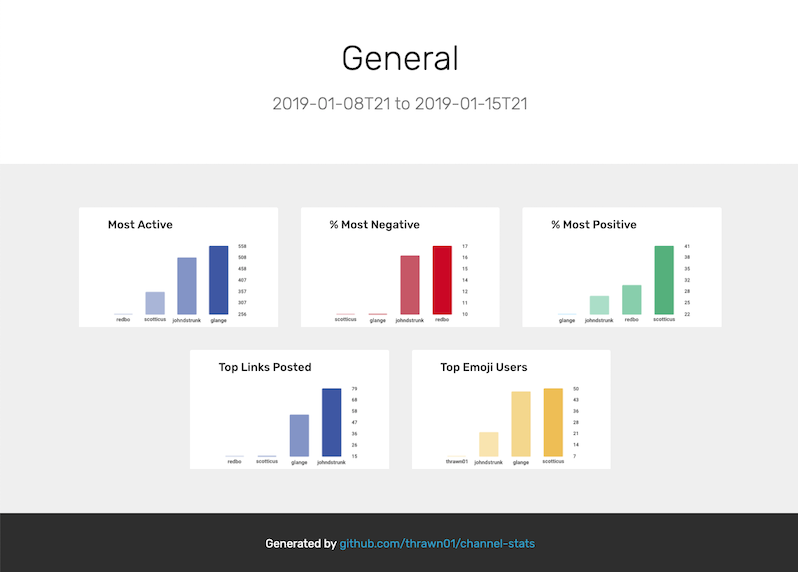
The UI needs some love, the original plan was to add a black header with a channel dropdown and date selectors but
my UI foo sucks. Send a PR if you have some ideas and want to improve it! (We don't have to use the png graphs, we
could also use something like chartjs to make the graphs pretty.) If you run go run ./cmd/channel-stats/main.go
it will serve the files in ./html instead of the compiled binary files. So you can change anything about the UI and
see the result without needing to recompile.
Easiest way to get started is by running channel-stats in a docker
container using the pre-built image.
# Download the docker-compose file
$ curl -O https://raw.githubusercontent.com/thrawn01/channel-stats/master/docker-compose.yaml

# Edit the compose file
# environment variables
$ vi docker-compose.yaml

# Run the docker container
$ docker-compose up -d

# Hit the API at localhost:2020
$ curl http://localhost:2020/api | jq- Download the release binary from Releases Page
- Download the example yaml
- Edit the example yaml
- Run
./channel-stats --config /path/to/config.yaml - Hit the api at
curl http://localhost:2020/api | jq
channel-stats uses go 1.11 modules for dependency management
$ git clone https://github.com/thrawn01/channel-stats.git
$ cd channel-stats
$ makeOnce you have provided your slack token and the bot is connected to slack, you must invite the bot to a channel. It will only collect stats for channels it has been invited too!
The bot stores event counts by hour such that when querying for results all
calls can include a start-hour and an end-hour. If no start or
end hour is provided then stats for the last 7 days is returned for
the specified channel.
The following is a list of available counter types for use with the
<counter> parameter.
| Type | Description |
|---|---|
| messages | The number of messages seen in channel |
| positive | The number of messages that had positive sentiment seen in channel |
| negative | The number of messages that had negative sentiment seen in channel |
| link | The number of messages that contain an http link |
| emoji | The number of messages that contain an emoji |
| word-count | The number of words counted in the channel |
NOTE: All date / hour formats follow RFC3339 short format 2018-12-06T01
Calls to /sum retrieve a summation of all counters for a specified duration
GET /api/sum
| Parameter | Description |
|---|---|
| start-hour | Retrieve counters starting at this hour |
| end-hour | Retrieve counters ending at this hour |
| channel | Channel to retrieve counters for |
| counter | Name of the counter (See 'Counters' for valid counter names) |
Get a count of messages for the last 7 days for channel 'general'
$ curl 'http://localhost:2020/api/sum?channel=general&counter=messages' | jq
{
    "start-hour": "2018-12-06T18",
    "end-hour": "2018-12-13T18",
    "items":[
        {
            "user": "foo",
            "sum": 20
        },
        {
            "user": "bar",
            "sum": 2
        }
    ]
}
Get a count of negative sentiment messages since midnight
$ curl 'http://localhost:2020/api/sum?channel=general&counter=negative&start-date=2018-12-13T00'Get a count of messages with emoji's in the last 2 days
$ curl 'http://localhost:2020/api/sum?channel=general&counter=emoji&start-hour=2018-12-11T00&end-hour=2018-12-13T00'Calls to /percentage retrieve a summation and percentage of total messages for a specified duration. This is useful
for figuring out what percentage of total messages have negative or positive sentiment.
GET /api/percentage
| Parameter | Description |
|---|---|
| start-hour | Retrieve counters starting at this hour |
| end-hour | Retrieve counters ending at this hour |
| channel | Channel to retrieve counters for |
| counter | Name of the counter (See 'Counters' for valid counter names) |
Get a percent of messages that have negative sentiment the last 7 days for channel 'general'
$ curl 'http://localhost:2020/api/percentage?channel=general&counter=negative' | jq
{
    "start-hour": "2018-12-06T18",
    "end-hour": "2018-12-13T18",
    "items":[
        {
            "user": "foo",
            "total": 241,
            "count": 53,
            "percentage": 21
        },
        {
            "user": "bar",
            "total": 186,
            "count": 30,
            "percentage": 16
        }
    ]
}You can get access to the raw counter data via the /datapoints endpoint
GET /api/datapoints
| Parameter | Description |
|---|---|
| start-hour | The start hour |
| end-hour | Then end hour |
| channel | Channel to retrieve counters for |
| counter | Name of the counter (See 'Counters' for valid counter names) |
Get all the counters for the last 7 days for the general channel
$ curl 'http://localhost:2020/api/datapoints?channel=general&counter=messages' | jq
{
    "start-hour": "2018-12-06T19",
    "end-hour": "2018-12-13T19",
    "items":[
        {
            "Hour": "2018-12-06T21",
            "UserID": "U02C73W94",
            "UserName": "redbo",
            "ChannelID": "C02C073ND",
            "ChannelName": "general",
            "DataType": "messages",
            "Value": 10
        },
        {
            "Hour": "2018-12-06T21",
            "UserID": "U02CG0QLN",
            "UserName": "glange",
            "ChannelID": "C02C073ND",
            "ChannelName": "general",
            "DataType": "messages",
            "Value": 8
        }
    ]
}