
MonitorBox : monitoring pro sans faux positifs. Recyclage de PC sous Debian, interface Terminal/Web + alertes critiques via Pager pour ne rater aucune urgence sous le flux des notifs mobiles. Zero-false-positive monitoring. Dual Terminal/Web views + Pager alerts to bypass smartphone notification clutter for critical emergencies.
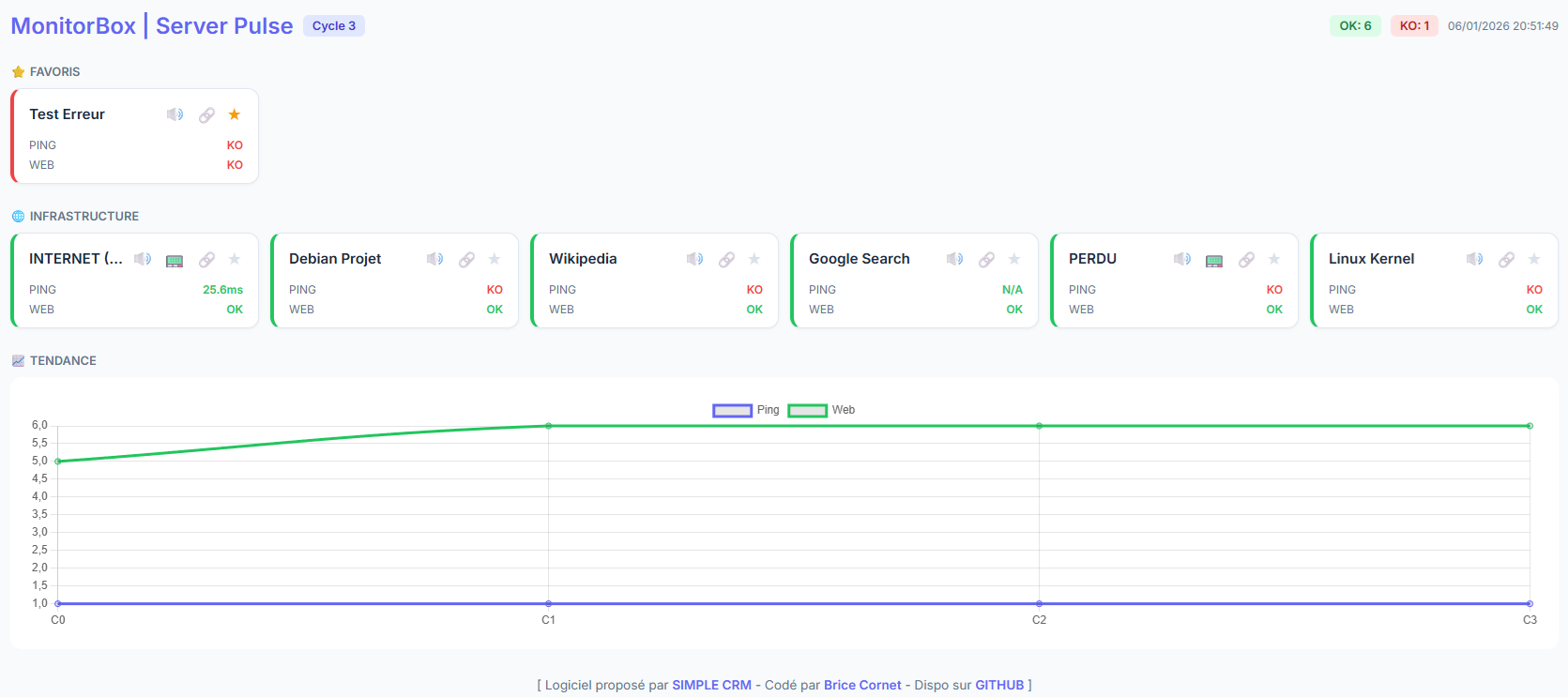
Le plus grand ennemi d'une équipe IT n'est pas la panne, c'est le faux positif. Lorsqu'un système de monitoring SaaS envoie des alertes injustifiées, l'équipe finit par les ignorer. C'est là que le danger survient : on rate la vraie panne au milieu du bruit numérique.
Server Pulse a été conçu avec une approche pragmatique :
- Zéro Faux Positif : Le script intègre une logique de double vérification (Retry) avant de confirmer un incident.
- Souveraineté et Recyclage : Pas besoin de serveurs puissants. Redonnez vie à une ancienne machine sous Debian. Si elle est lente, optimisez-la avec Optinux.
- Le retour du Pager : Nos smartphones sont noyés sous les notifications (emails, Slack, réseaux sociaux). Si votre téléphone sonne, vous hésitez. Si votre PAGER sonne, vous savez que c'est une urgence critique. Ressusciter cette technologie "Old School" permet de sortir l'alerte de la pollution numérique.
- Dual-View : Un affichage en temps réel dans le TERMINAL (idéal pour un écran de contrôle permanent) et une INTERFACE WEB moderne et réactive.
- Hybride : Surveillance simultanée du réseau (Ping avec temps de latence) et de l'applicatif (recherche de mots-clés via Curl).
- Alertes Multi-niveaux : Audio local (Espeak & MP3), interface visuelle, et transmission radio via Pager (via port série).
- Léger : Pas de base de données complexe. Un simple fichier
servers.confet du JavaScript statique.
The greatest enemy of an IT team isn't a system failure; it's the false positive. When SaaS monitoring systems send unjustified alerts, teams eventually stop looking at them. This "crying wolf" effect is dangerous: you miss the real disaster amidst the digital noise.
Server Pulse was built with a pragmatic mindset:
- Zero False Positives: The script features a built-in double-check (Retry) logic before confirming any downtime.
- Sovereignty & Recycling: No need for high-end hardware. Breathe new life into an old Linux Debian box. If the machine is sluggish, optimize it using Optinux.
- The Pager Revival: Smartphones are flooded with notifications (emails, Slack, social media). When your phone pings, you hesitate. When your PAGER beeps, you know it's a critical emergency. Reviving this "Old School" technology extracts the alert from the digital pollution.
- Dual-View: Real-time monitoring via the TERMINAL (perfect for a persistent NOC display) and a modern, responsive WEB INTERFACE.
- Hybrid Monitoring: Simultaneous checks for network connectivity (Ping with latency tracking) and application health (Keyword search via Curl).
- Multi-level Alerts: Local audio (Espeak & MP3), visual web cues, and radio transmission for Pagers (via serial port).
- Lightweight: No heavy database required. Just a simple
servers.conffile and static JavaScript.
- Logiciel proposé par : SIMPLE CRM
- Développement : Brice Cornet
Ce fichier vous permet de lister tous les serveurs et sites web que vous voulez surveiller. Le script lira ce fichier ligne par ligne.
- LA SYNTAXE (LA RÈGLE)
Chaque ligne représente un serveur. Chaque information est séparée par un POINT-VIRGULE (;) comme ceci :
URL ; NOM ; PING ; MOT-CLÉ ; MESSAGE AUDIO ; PAGER
Il y a exactement 6 colonnes à remplir.
- DÉTAIL DES COLONNES
-
URL : L'adresse complète du site (doit commencer par http ou https). Exemple : https://www.google.com
-
NOM : Le nom simplifié qui s'affichera sur votre écran. Exemple : Moteur Google
-
PING : Est-ce qu'on teste si le serveur répond au "ping" ?
- Tapez "yes" pour activer.
- Tapez "no" pour ignorer le ping.
-
MOT-CLÉ : Un mot qui doit obligatoirement être présent dans la page. Si le mot disparaît, le script considère que le site est en panne (ex: erreur 404 ou page blanche). Exemple : "Google" pour Google, ou "Wikipedia" pour Wikipédia.
-
MESSAGE AUDIO : Le texte que l'ordinateur va dire tout haut via les haut-parleurs si le site tombe en panne. Exemple : "Alerte, le site Google ne répond plus"
-
PAGER : Est-ce qu'on envoie une alerte sur le Pager physique ?
- Tapez "yes" pour envoyer l'alerte.
- Tapez "no" pour ne rien envoyer.
- EXEMPLES CONCRETS
Voici à quoi doit ressembler votre fichier servers.conf :
https://www.google.com;Google Search;yes;Google;Attention, Google est inaccessible;yes
https://fr.wikipedia.org;Wikipedia FR;no;Wikipédia;Le serveur Wikipedia semble hors ligne;no
https://0101-zebridge.crm-simple.com;Serveur CRM;no;CRM;Alerte sur le serveur de production;yes
- ASTUCES ET ERREURS À ÉVITER
- Ne mettez pas de point-virgule (;) à l'intérieur de vos messages audio, sinon le script sera perdu.
- Les lignes commençant par un dièse (#) sont des commentaires, le script ne les lira pas.
- Si vous modifiez ce fichier, le script prendra les changements en compte lors du prochain tour de surveillance (cycle).
This file allows you to list all the servers and websites you want to monitor. The script reads this file line by line.
- THE SYNTAX (THE RULE)
Each line represents one server. Each piece of information is separated by a SEMICOLON (;) as follows:
URL ; NAME ; PING ; KEYWORD ; AUDIO MESSAGE ; PAGER
There are exactly 6 columns to fill.
- COLUMN DETAILS
-
URL: The full website address (must start with http or https). Example: https://www.google.com
-
NAME: The simplified name that will appear on your screen. Example: Google Search Engine
-
PING: Do we test if the server responds to a "ping"?
- Type "yes" to enable.
- Type "no" to ignore the ping.
-
KEYWORD: A word that must be present on the page. If the word disappears, the script considers the site to be down (e.g., 404 error or blank page). Example: "Google" for Google, or "Wikipedia" for Wikipedia.
-
AUDIO MESSAGE: The text the computer will speak out loud through the speakers if the site goes down. Example: "Alert, Google website is no longer responding"
-
PAGER: Do we send an alert to the physical Pager?
- Type "yes" to send the alert.
- Type "no" to send nothing.
- CONCRETE EXAMPLES
Here is what your servers.conf file should look like:
https://www.google.com;Google Search;yes;Google;Warning, Google is unreachable;yes
https://en.wikipedia.org;Wikipedia EN;no;Wikipedia;The Wikipedia server seems to be offline;no
https://0101-zebridge.crm-simple.com;CRM Server;no;CRM;Alert on the production server;yes
- TIPS AND ERRORS TO AVOID
- Do not use semicolons (;) inside your audio messages, otherwise the script will fail to read the line correctly.
- Lines starting with a hash (#) are comments; the script will ignore them.
- If you modify this file, the script will apply the changes during the next monitoring round (cycle).
====