


A terminal image renderer that can construct images using any set of unicode symbols
.......................................................................
.......................................................................
..._______L.._____.....__BBBa__.....____________..........___..........
...==BBBP=...=mB==....aBBP~~=BB_....==BBBe===BBB_.........BBBL.........
.....BBB....._B-.....eBBF....eBB_.....BBB....~BBB_........BBB_.........
.....BBB...._B-.....ABBB.....JBBB.....BBB.....eBBa.......ABBBB.........
.....BBB..._BF......BBB.......BBBL....BBB.....aBBB.......BRBBBL........
.....BBB.._BF......JBBB,......eBBa....BBB.....BBBe......JB^BBB_........
.....BBB._BF.......ABBBL......aBBB....BBB...._BBB-......A#.eBBB........
.....BBB_BB_.......aBBB.......aBBB....BBBa__BBB=^.......BL.3BBBL.......
.....BBBBBBB_......aBBB.......aBBBL...BBBe===BBa_......JB...BBBa.......
.....BBBPeBBB_.....aBBB.......aBBBL...BBB....~aBB_.....aF...mBBB.......
.....BBB..BBBa.....aBBBL......aBBB....BBB.....mBBBL....BL...3BBBL......
.....BBB..~BBB_....3BBBL......BBBB....BBB.....JBBBa...JBBBBBBBBBa......
.....BBB...=BBB_....BBBL......BBB#....BBB.....JBBBa...ar~~~~~mBBBL.....
.....BBB....eBBB_...mBB_.....JBBBL....BBB.....JBBBe...B......JBBBL.....
.....BBB.....BBBBL...BBBL....ABBP.....BBB.....aBBB,..Je.......BBBa.....
...__BBB__...~BBB__:.~BBa_.._BB=....__BBB____aBBBP.._BL_....._BBBB__...
...BBBBBBBL...=BBBB...~=BBaBBB=.....BBBBBBBBBBB=~...BBBB.....BBBBBBa...
.........................~~~~..........................................
.......................................................................
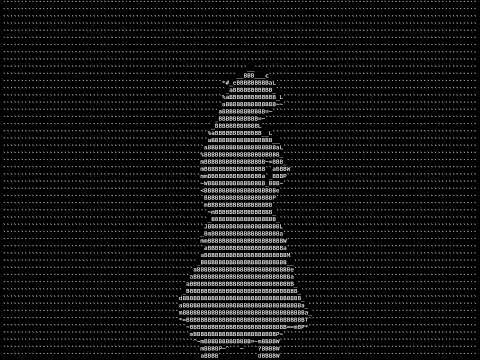
Click the image to watch a demo on YouTube:
pip install kobaNo Python?
You can also download a binary for Linux, Windows, or macOS from the releases tab. Note: These binaries are slower, sometimes outdated and not recommended unless you cannot use Python. They might also be detected as viruses by some antivirus software. They must be run from the command line.
# Basic usage
koba image.png

# Use different similarity engine
koba image.jpg --engine diff

# Render GIF in color
koba image.gif --color

# Render Video in color
koba video.mp4 --color

# Render Video in color with fast mode (only using █ character)
koba video.mp4 --fast-color

# Custom character set (box drawing characters)
koba image.png --char-range 9600-9632

# Custom font
koba image.jpg --font /path/to/font.ttf

# Debugging
koba image.png --logging-level DEBUG --save-blocks --save-chars

# Custom font with specific characters
koba logo.png --font ./fonts/custom.ttf --char-range 65-90 --engine mse
You can also run
kobaas a module withpython3 -m koba [OPTIONS] FILE.
Note: If your custom font does not include a character, koba will automatically use a system font just for that missing character.
- 🎞️ Animated image support: Render animated images (e.g., GIFs) directly in the terminal
- 🎨 Multiple similarity engines for different visual styles
- 🌈 Color rendering support for truecolor terminals (
--color) - 🔤 Custom character ranges including Unicode, Braille, and symbols
- 🖋️ Custom font support with TTF files
- ⚡ Multi-threaded processing for fast rendering
- 🎛️ Adjustable output quality with scaling and aspect ratio control
koba [OPTIONS] FILE
python3 -m koba [OPTIONS] FILE
| Option | Description | Default |
|---|---|---|
--version |
Show version and exit | |
--color |
Render in color | |
--fast-color |
Enable color and use █ (U+2588) for faster processing (recommended for animated images) | |
--char-aspect INTEGER |
Character height-to-width ratio for aspect-correct output | 2 |
--logging-level TEXT |
Set verbosity: CRITICAL, ERROR, WARNING, INFO, DEBUG | ERROR |
--save-blocks |
Save image blocks as PNG files in 'blocks/' directory | |
--save-chars |
Save rendered character images in 'chars/' directory | |
-e, --engine TEXT |
Similarity metric (see engines below) | diff |
--font TEXT |
Path to custom TTF font file | |
--char-range TEXT |
Unicode range as start-end (e.g., 32-128) | 32-126 |
--stretch-contrast |
Stretch image contrast to potentially improve results | |
--scale FLOAT |
Scale factor for image display | 1.0 |
--invert |
Inverts the image for processing (Color will not be inverted when using --color). |
|
--single-threaded |
Disable multi-threading |
Choose the engine that best fits your artistic vision:
diff- Pixel-wise difference, balanced quality/speed (default)brightness- Fast, good for simple imagesmse- Mean squared error, precise pixel matchingssim- Structural similarity, good for complex imagesncc- Normalized cross-correlation, good for textured imageshist- Histogram comparison, emphasizes tonal distributioncosine- Cosine similarity, unique artistic effects
32-126- Basic ASCII printable characters32-128- Extended ASCII (default)9600-9631- Block drawing characters9632-9727- Geometric shapes10240-10495- Braille patterns (high detail)0-1114111- Full Unicode range (basically impossible)
⚠️ Depending on your terminal and its font settings, some characters may not display correctly if they are not supported by your terminal's font.
# Retro terminal look
koba image.png --char-range 32-126

# Geometric patterns
koba image.png --char-range 9632-9727This project is licensed under the GNU General Public License v3.0 - see the LICENSE file for details.