
SiteBuilder is a Symfony web application for AI-assisted content editing. It gives non-engineering teams a normie-friendly way to edit web content projects like marketing pages, while still keeping engineers happy with Git-backed source control and clean PR workflows.
The app lets users connect set up content management projects backed by Git repositories, work inside isolated workspaces, and use chat-based workflows to edit files with an AI agent. It manages workspace lifecycle and review steps so changes can be inspected before merging.
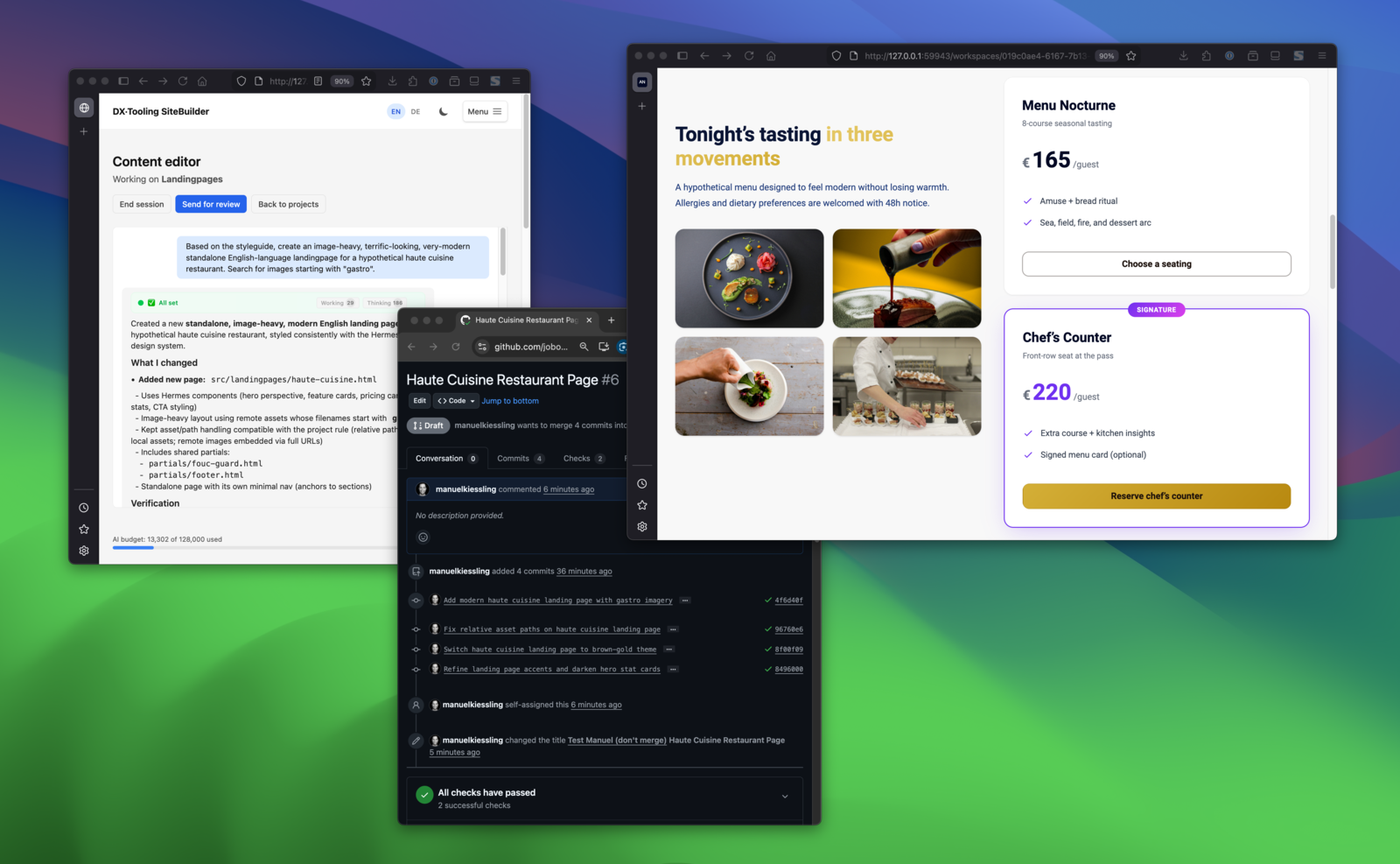
Edit in chat → see the result → changes in a PR.
SiteBuilder is the content management tool that creators love to use and engineering loves to support.
Click to watch demo
- UX Improvements: Conversation History and Reviewer Dashboard
- Smarter Agent Tools: Better Commits and Preview Links
- January 2026 Updates: BYOK, Custom Agents, and More
- Strong Workspace Isolation with Docker Containers
- Deep Dive: Introducing SiteBuilder
- A Symfony 7.4 backend that manages projects, workspaces, and conversations
- A Stimulus + TypeScript frontend for the editor UI and live interactions
- Dockerized execution for workspaces and background processing
- An opinionated vertical architecture with strict boundaries between features
- PHP 8.4, Symfony 7.4, Doctrine ORM
- MariaDB 12
- TypeScript, Stimulus, Tailwind CSS, AssetMapper
- Docker + Docker Compose
- Mise for tool and task orchestration
The codebase is organized into verticals (feature modules) under src/. Each vertical has its own layers (Domain, Facade, Infrastructure, Api, Presentation). Cross-vertical communication happens only via Facades and DTOs. Client-side controllers live next to their vertical in src/<Vertical>/Presentation/Resources/assets/controllers/.
For details, see:
docs/archbook.mddocs/frontendbook.mddocs/workspace-isolation.md
- Docker Desktop
- Mise (https://mise.jdx.dev)
- an unixoid system like Linux, macOS, or Windows Subsytem for Linux
# 1) Trust mise in this repo
mise trust

# 2) Bootstrap the local environment
mise run setup
mise run setup will:
- Create
.env.localwithHOST_PROJECT_PATHif missing - Build and start Docker containers
- Install PHP and frontend dependencies
- Create and migrate the database
- Build frontend assets
- Run quality checks and tests
- Open the app in your browser
All commands should be run via mise run so they execute inside the app container.
- Quality checks:
mise run quality - PHP tests:
mise run tests - Frontend tests (Vitest):
mise run tests:frontend - Build frontend assets:
mise run frontend - Symfony console:
mise run console <command> - Database shell:
mise run db
More tasks are documented in:
docs/devbook.mddocs/setupbook.md
- Add new features as new verticals under
src/<FeatureName>/. - Expose cross-vertical behavior through Facade interfaces and DTOs.
- Keep client-side code inside the same vertical to maintain boundaries.
.envprovides defaults; use.env.localfor machine-specific overrides.HOST_PROJECT_PATHmust be set for workspace execution (see setup).
docs/archbook.md— architecture and boundariesdocs/devbook.md— recurring dev tasksdocs/setupbook.md— full setup guidedocs/frontendbook.md— frontend conventionsdocs/deployment-quickref.md— deployment notes

