A high-performance, serverless image processing service built with AWS Lambda, TypeScript, Sharp, and AWS SDK v3.
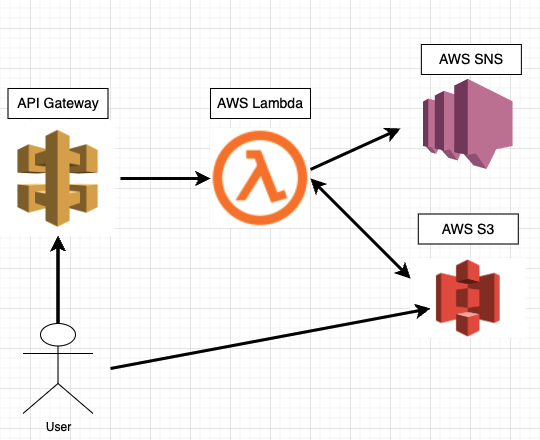
The function dynamically resizes, converts, rotates, and fits images stored in Amazon S3, and returns a redirect URL to the processed result.
The project is fully optimized with serverless-esbuild, uses Amazon SNS for error notifications, and integrates AWS X-Ray for distributed tracing of S3/SNS calls.
ImageResizer_AWS_Lambda is a scalable serverless image transformation engine.
It retrieves images from S3, processes them using Sharp, and stores output images back into S3 under a /resized/ directory.
All functions are exposed through API Gateway using Lambda proxy integration.
This architecture requires no servers, scales automatically, and is cost-efficient — suitable for:
- Dynamic CDN image resizing
- Thumbnail generation
- Automated image pipelines
- On-demand image transformation APIs
- Node.js (18+)
- TypeScript
- Sharp — high-performance image manipulation
- Serverless Framework
- AWS Lambda — compute engine
- Amazon S3 — original + processed image storage
- Amazon SNS — error alert delivery
- AWS X-Ray — tracing for S3 / SNS calls
- Amazon API Gateway — request routing
- serverless-esbuild for fast bundling
- AWS SDK v3 modular client for S3 & SNS
- Custom logger
- CloudWatch Logs integration
Resize to a given width while maintaining aspect ratio.
GET /resizeImages/{files}/{width}
Output filename format:
resized/resizeImages_<width>_<filename>
Resizes to an exact W × H using fit: fill.
GET /convertSizeImages/{files}/{width}/{height}
resized/convertSizeImages_<W>_<H>_<filename>
Rotate by any angle (0–359).
GET /rotateImages/{files}/{angle}
resized/rotateImages_<angle>_<filename>
Resizes the image to fit within W × H using fit: contain.
GET /fitSizeImages/{files}/{width}/{height}
resized/fitSizeImages_<W>_<H>_<filename>
For each transformation:
- Checks existence via
HeadObjectCommand - Skips processing if already generated
- Improves speed & reduces Lambda cost
If S3 retrieval fails:
- Lambda logs the event
- SNS sends a notification to the registered phone number
Useful for production monitoring.
Instrumented using:
AWSXRay.captureAWSv3Client(new S3Client(...))Captures subsegments for:
- S3 GetObject
- S3 PutObject
- S3 HeadObject
- SNS Publish
- Node.js 18+
- npm or yarn
- Serverless Framework
npm install -g serverless
Configure via AWS CLI or env variables:
export AWS_ACCESS_KEY_ID=xxxx
export AWS_SECRET_ACCESS_KEY=xxxx
export AWS_REGION=ap-northeast-2
Or located at:
~/.aws/credentials
| Variable | Description |
|---|---|
bucket |
S3 bucket name for image storage |
redirect |
Base redirect URL after processing |
phone |
Phone number for SNS alerting |
message |
Message body used by SNS |
access |
Optional custom AWS key |
secret |
Optional custom AWS secret |
- S3 bucket with
images/folder - SNS publish permissions
- Lambda execution role for S3 + SNS
- API Gateway (auto-generated by Serverless)
- See the Dockerfile in this repository or the bash script below
docker run -it  amazonlinux:2023 /bin/bash

yum upgrade -y
yum update -y
yum install -y gcc-c++ make

curl -sL https://rpm.nodesource.com/setup_18.x | bash -
dnf install nodejs -y
yum install -y nodejs
npm install -g serverless
npm install -g npm@11.6.4
npm install web3 --unsafe-perm=true --allow-root

yum install git -y

serverless config credentials --provider aws --key <ACCESS_KEY> --secret <SECRET_KEY>- Read .circleci/config.yml from CircleCI connected to this Git Repository and build & deploy

- Since serverless-offline is installed
- After setting the environment variable of process.env locally
- If you enter the following command, you can launch Lambda in Local and test it.
sls offline start-
First, Go to Lambda console monitoring, configuration tap and let X-Ray avaliable
-
If you have enabled Lambda X-Ray, you can see the API call trace and API response time as below.


