An HTTPS Connector made to send data from the mining rig to Splunk
- Linux OS using BASH Shell
- Deployed Splunk HTTP/S Connector with port 8088 opened (!)
- JQ - JSON File Parser binaries (can be downloaded with apt-get)
The Bash scripts in this repository are meant to be used with Simple Mining OS (https://simplemining.net/) The OS Supplies the scripts with data from the GPU and host on /var/tmp folder, theoretically, those scripts can be used in any Linux OS but with some adjustment.
- Main Scripts which include: data_send.sh and send_lazy_logs.sh (Required)
- rest of the scripts in the helper_script folder (Optional)
Main Scripts:
- data_send.sh - its job is to gather the data from multiple sources parse them, timestamp the logs, and send them to Splunk Contains multiple config options that must be set and customize (More this in Q & A Section)
- send_lazy_log.sh - its job is to collect the logs that were not sent to Splunk due to any error and resend them (using the original data_send.sh Timestamp!) this means if your Splunk machine is down for 12 hours after send_lazy_log complete, Splunk will auto-complete the logs in their respected timestamp (No Missing logs again!)
Helper Scripts:
Those scripts are used to get additional data from the web using web scarping I.E: Currency rate from USD To NIS (Bank of Israel) or ETH Price to USDT (Binance)
data_send.sh:
- miner_name - this is the name of your miner, this will be the first field in the Splunk log (useful for multiple miners)
- miner_logs_path - this is a temporary path for the logs to be saved in the case the Splunk server is offline or unreachable (Local backup for logs)
- miner_helper_scripts_path - the path to the helper scripts folder
- splunk_HTTP_Connector_Token - This token is generated by Splunk upon creating a new HTTP connector, Splunk will use this token as authentication and cannot work without it
- splunk_machine_ip_port - set you splunk machine IP/Domain_address, default port for splunk http connector is 8088
- stats_data_path - the path from which the script will gather data file from, the default value is "/var/tmp" for Simplemining OS Data logs.
- data_list - contains a grep 'list' that includes all the files name you want to gather data from.
- sleep_offset - can be used to offset the time of the script activation, for example, if you want two scripts with the same crontab to run one after the other. default is 0 seconds
- the use_helper_scripts - Enables and disables the use of external helper scripts
- timestamp - signs the logs file with the local time of the machine (Please set your machine the correct time or sync it with the Splunk machine time)
send_lazy_logs.sh:
- miner_name - this is the name of your miner, this will be the first field in the Splunk log (useful for multiple miners)
- miner_logs_path - this is a temporary path for the logs, the script will take all the logs in this folder and resend them to Splunk
- splunk_HTTP_Connector_Token - This token is generated by Splunk upon creating a new HTTP connector, Splunk will use this token as authentication and cannot work without it
- splunk_machine_ip_port - set you splunk machine IP/Domain_address, default port for splunk http connector is 8088
- sleep_offset - this script needs a delay so it will run after data_send to prevent logs lagging behind 1 minute, default is 10 seconds.
Q1: If Simplemining gives me a dashboard anyway, why would I need Splunk?
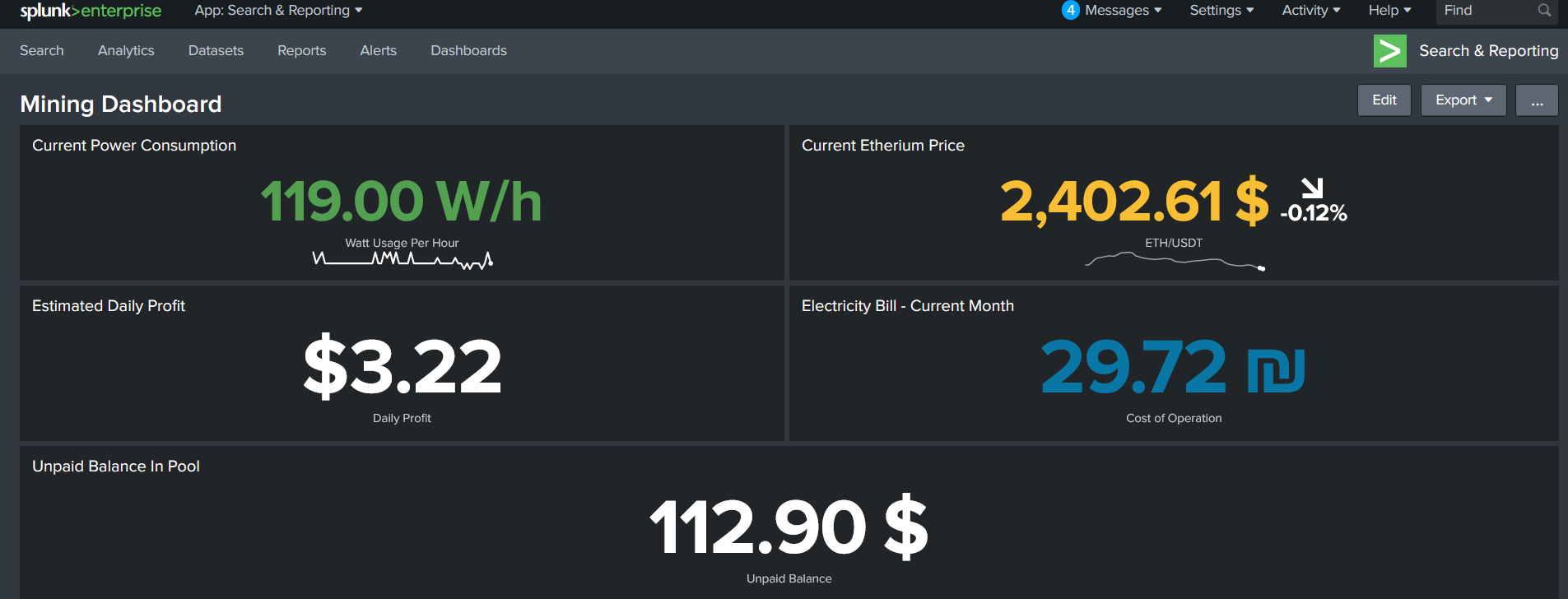
A1: you are correct Splunk here is optional but it allows you to do some advanced Calculations for example Calculate your electricity bill without external Hardware or Calculate your daily profit with daily cost.
Q2: Can I add my custom values or stats to the script (I.E: BTC To ETH price)
A2: Yes definitely - please follow the steps below:
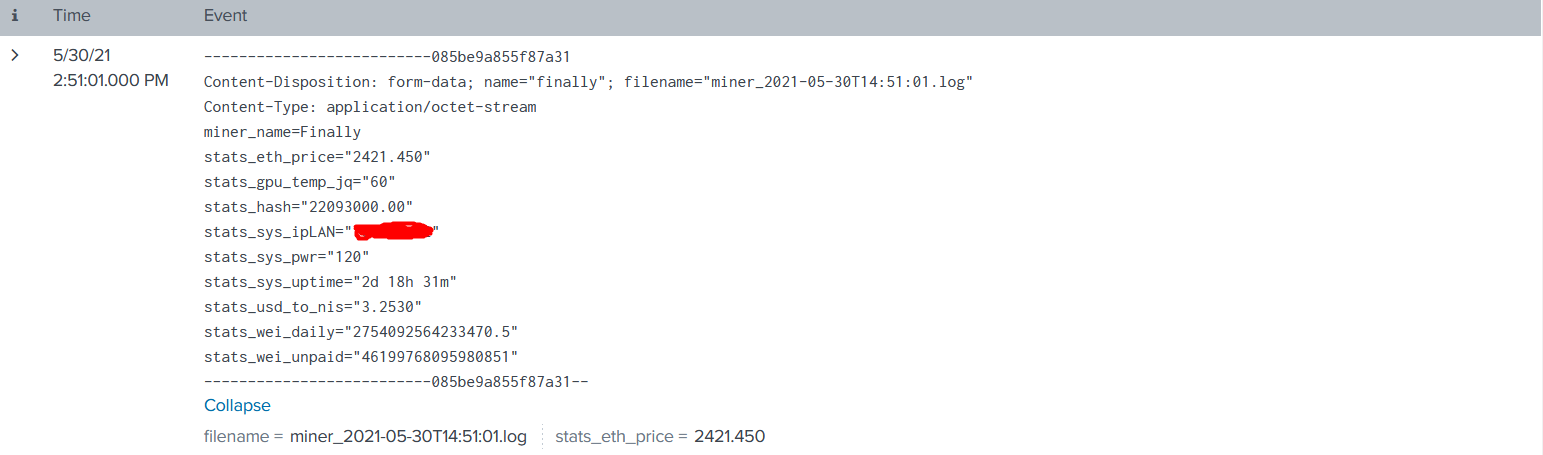
- Save a file under your set "stats_data_path" (from data_send.sh config section) path with the value you want to send, the name of the file will be the name of the field in Splunk(!)
- append the file name to "data_list" variable using '\|' delimiter (format is : <Filename1>\|<Filename2>)
- Run data_send.sh and the values will be added as a field in the log added to Splunk
Q3: Can I add my custom helper script?
A3: Yes, The script works as follows (data_send):
- Enable the use_helper_scripts Switch in data_send script from "$false" to "$true"
- data_send gets the filename list it needs to send from the variable data_list so please be sure the output file name of your custom script is added to this variable
- data_send execute the helper scripts from the path miner_helper_scripts_path using bash (only .sh files)
- after helper scripts are executed the data_send script fetches the data from the files in stats_data_path folder with the data_list as grep filter - in simple words stats_data_path can contain whatever you want but only the filenames in data_list variable will be sent to Splunk.
- Please also Refer to Q2 For more in depth answer
My Final Dashboard in Splunk:
 Raw data in splunk:
If You have any question you can contact me on ooorannn@gmail.com or though github (if that possible :P), Have a great day.