中文 | 日本語 | 한국어 | Русский | Español | Français | Deutsch
🌐 A Modern, Multilingual, and Feature-Rich Web-Based Tic-Tac-Toe Game 🌐









- Introduction
- Features
- System Requirements
- Installation
- Getting Started
- Usage
- Demo
- Contributing
- Security
- Code of Conduct
- Support
- License
- Acknowledgements
Ultimate Tic-Tac-Toe is an open-source, web-based implementation of the classic Tic-Tac-Toe game, enhanced with modern features and a polished user experience. Built with HTML5, CSS3, and JavaScript, it offers multilingual support, customizable themes, an AI opponent, and gameplay enhancements like timers, score tracking, and undo functionality. Designed for players of all ages, it provides a fun and accessible way to enjoy Tic-Tac-Toe on any device.
Hosted on GitHub Pages, Ultimate Tic-Tac-Toe is available online without installation, but can also be run locally. As an open-source project, it welcomes contributions to improve features, fix bugs, or enhance accessibility.
Note: This project is actively maintained. Some features, such as the AI's strategy or animation performance, may have limitations. Your feedback is appreciated!
- Classic Tic-Tac-Toe Gameplay: Standard 3x3 grid with X and O symbols, aiming for three in a row (horizontal, vertical, or diagonal).
- Play Modes:
- Human vs. Human (local play on the same device).
- Human vs. AI (basic random-move AI for the opponent).
- Multilingual Support: Available in 8 languages:
- English, Chinese (中文), Japanese (日本語), Korean (한국어), Russian (Русский), Spanish (Español), French (Français), German (Deutsch).
- Customizable UI:
- Color Schemes: Choose from Default, Dark, Light, or Colorful themes.
- Fonts: Select from Poppins, Roboto, or Open Sans.
- Game Features:
- Timer: Tracks game duration with start, stop, and reset controls.
- Score Tracking: Displays wins for Player X, Player O, and draws.
- Undo Move: Revert the last move during an active game.
- Player Names: Customize names for Player X and Player O.
- Win Celebration: Confetti animation on victory.
- Settings:
- Change language, color scheme, or font via a settings modal.
- Save preferences to local storage for persistence across sessions.
- Responsive Design: Optimized for desktop, tablet, and mobile devices.
- Visual Effects:
- Animated landing page with a loading effect and bubble background.
- Highlighted winning cells for clear victory indication.
- Accessibility: Includes
data-i18nattributes for translations and basic keyboard support. - No Ads: A distraction-free gaming experience.
To run Ultimate Tic-Tac-Toe, ensure you have:
- Web Browser: Modern browser (e.g., Chrome, Firefox, Edge, Safari) with JavaScript enabled.
- Operating System: Any (Windows, macOS, Linux, iOS, Android) with a compatible browser.
- Disk Space: Minimal (~5 MB for application files, including assets).
- Internet Connection: Required for initial asset loading (e.g., Google Fonts) unless hosted locally.
- Dependencies: None (all assets are loaded via CDNs or local files).
Follow these steps to set up Ultimate Tic-Tac-Toe locally:
-
Clone the Repository:
git clone https://github.com/VoxDroid/Ultimate-Tic-Tac-Toe.git
-
Navigate to the Project Directory:
cd Ultimate-Tic-Tac-Toe -
Open the Application:
- Double-click
index.htmlto open it in your default web browser. - Alternatively, serve the files using a local server (recommended for proper asset loading):
Then access
python -m http.server 8000
http://localhost:8000in your browser.
- Double-click
-
Verify Functionality:
- Ensure the landing page loads with the logo, title, and "Start Game" button.
- Click "Start Game" to enter the game interface and test a move (e.g., place an X in a cell).
- Check that the settings modal, language selector, and game controls (e.g., timer, undo) work.
Note: Ensure CDN-loaded assets (e.g., Google Fonts) are accessible. For offline use, consider downloading fonts and hosting them locally.
To start playing Ultimate Tic-Tac-Toe:
-
Access the Game:
- Play online at voxdroid.github.io/Ultimate-Tic-Tac-Toe.
- Or open
index.htmllocally as described in Installation.
-
Navigate the Landing Page:
- Select a language from the dropdown (English by default).
- Click "Start Game" to transition to the game interface with a loading animation.
-
Explore the Interface:
- Game Board: A 3x3 grid for placing X or O symbols.
- Game Info Panel: Includes player name inputs, timer, score display, and controls (undo, new game, AI move, reset score).
- Settings: Access via the settings button to adjust language, color scheme, or font.
- Status Bar: Shows the current player's turn or game outcome.
-
Start a Game:
- Click "Start Game" to initialize the board.
- Click a cell to place your symbol (X starts first).
- Use the AI Move button to let the AI play as the opponent.
-
Customize Settings:
- Open the settings modal to change the color scheme, font, or language.
- Enter player names in the input fields.
- Save settings automatically to local storage.
- Human vs. Human:
- Players alternate placing X or O in empty cells (X moves first).
- Click a cell to make a move.
- Aim for three symbols in a row (horizontal, vertical, or diagonal).
- Human vs. AI:
- Play as X or O; click the "AI Move" button to let the AI make a random move.
- The AI selects a random empty cell.
- Controls:
- New Game: Resets the board and timer.
- Undo: Reverts the last move (if the game is active).
- AI Move: Triggers an AI move for the opponent.
- Start/Stop/Reset Timer: Manages the game timer.
- Reset Score: Clears the win/draw counters.
- Language: Select from 8 languages via the dropdown on the landing page or game interface.
- Color Scheme: Choose Default, Dark, Light, or Colorful in the settings modal.
- Font: Switch between Poppins, Roboto, or Open Sans.
- Player Names: Enter custom names for Player X and Player O in the input fields.
- Timer: Displays elapsed time in MM:SS format, with controls to start, stop, or reset.
- Score Tracking: Tracks wins for X, O, and draws, displayed in the game info panel.
- Undo Move: Allows reverting the last move, preserving game state.
- Win Celebration: Triggers a confetti animation when a player wins.
- Notifications: Shows turn indicators, win messages, or draw/game-over alerts in the selected language.
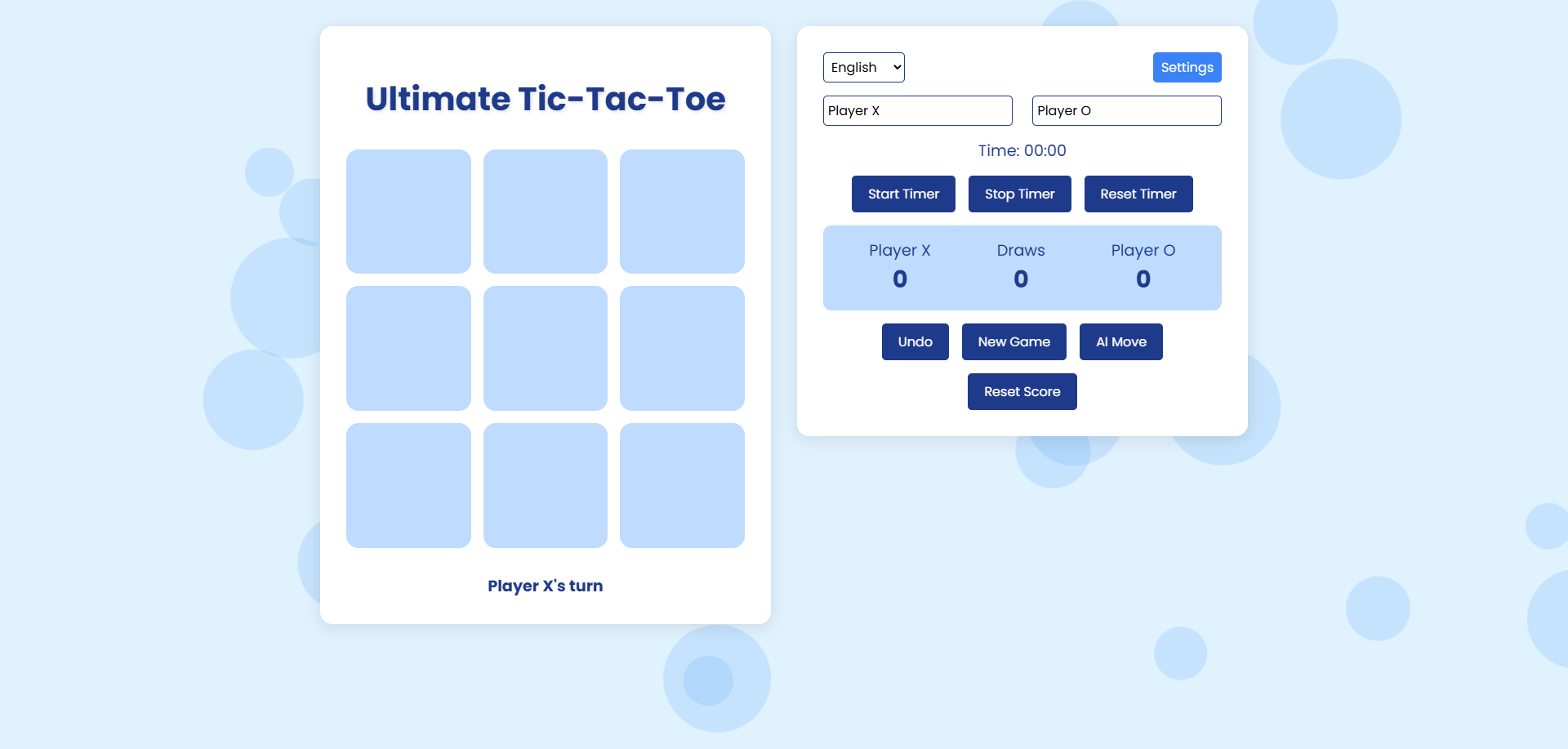
Try Ultimate Tic-Tac-Toe live at voxdroid.github.io/Ultimate-Tic-Tac-Toe.
We welcome contributions to Ultimate Tic-Tac-Toe! To get involved:
- Review the Contributing Guidelines for details on submitting issues, feature requests, or pull requests.
- Fork the repository, make changes, and submit a pull request.
- Adhere to the Code of Conduct to ensure a respectful community.
Example contributions:
- Enhance the AI with a smarter algorithm (e.g., minimax).
- Add new color schemes or fonts.
- Improve accessibility (e.g., ARIA attributes, keyboard navigation).
- Implement ultimate Tic-Tac-Toe rules (9x9 grid with sub-boards).
Security is a priority for Ultimate Tic-Tac-Toe. If you discover a vulnerability:
- Report it privately as outlined in the Security Policy.
- Avoid public disclosure until the issue is resolved.
All contributors and users are expected to follow the Code of Conduct to maintain a welcoming and inclusive environment.
Need help with Ultimate Tic-Tac-Toe? Visit the Support page for resources, including:
- Filing bug reports or feature requests.
- Community discussions and contact information.
- FAQs for common issues (e.g., AI behavior, timer issues).
Ultimate Tic-Tac-Toe is licensed under the MIT License. See the LICENSE file for details.
- Google Fonts: For providing Poppins, Roboto, and Open Sans fonts.
- VoxDroid: For creating and maintaining the project.
- Contributors: Thanks to all who report issues, suggest features, or contribute code.
- Tic-Tac-Toe Community: For inspiring this project with resources and ideas.



