Sort
The sorting of properties is optional and divided into two parts, which are column and row.
#STB-Input-{Space}-{Datatype}-[column, row]
If nothing is defined as sorting for a property, because it is optional, it will be drawn with internal sorting after the sorted properties.
The column and the row must be in a range from 0 to infinite. If that's not the case, they will be drawn with internal sorting after the sorted properties.
The column identifies where to draw the property vertical and must be written as an integer. It is used internally like an index for an array. If a column start with a high number than 0 the column will be filled up with empty spaces.
The row is optional and is more complex than the column. It can be written with 1 number as index like the column but can be written as float. If a row start with a high number than 0, the left side will be filled up with an empty space that get scaled with the float of the row. The row can also take two numbers by separate the two numbers with a /. The left number works as the index like before the right number will be used to fill up the right side, which works in the same way.
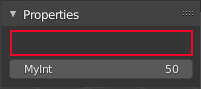
#STB-Input-Panel-Int-[1]
MyInt = 50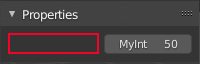
#STB-Input-Panel-Int-[0,1]
MyInt = 50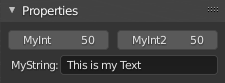
#STB-Input-Panel-Int-[0,0]
MyInt = 50
#STB-Input-Panel-Int-[0,1]
MyInt2 = 50
#STB-Input-Panel-String-[1]
MyString = "This is my Text"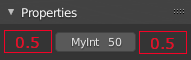
#STB-Input-Panel-Int-[0,0.5/0.5]
MyInt = 50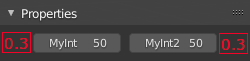
#STB-Input-Panel-Int-[0,0.3]
MyInt = 50
#STB-Input-Panel-Int-[0,1/0.3]
MyInt2 = 50
Can also be written like this:
#STB-Input-Panel-Int-[0,0.3/2]
MyInt = 50
#STB-Input-Panel-Int-[0,1/0.3]
MyInt2 = 50
2 in int the first property can be any number. If a Property follows directly onto the next index the space is ignored. To draw the space you have to put the second property coulmn-index to 2.