A GTK-based GUI frontend for yt-dlp. Download videos, audio, and playlists easily with cookie extraction, SponsorBlock, and GNOME integration.
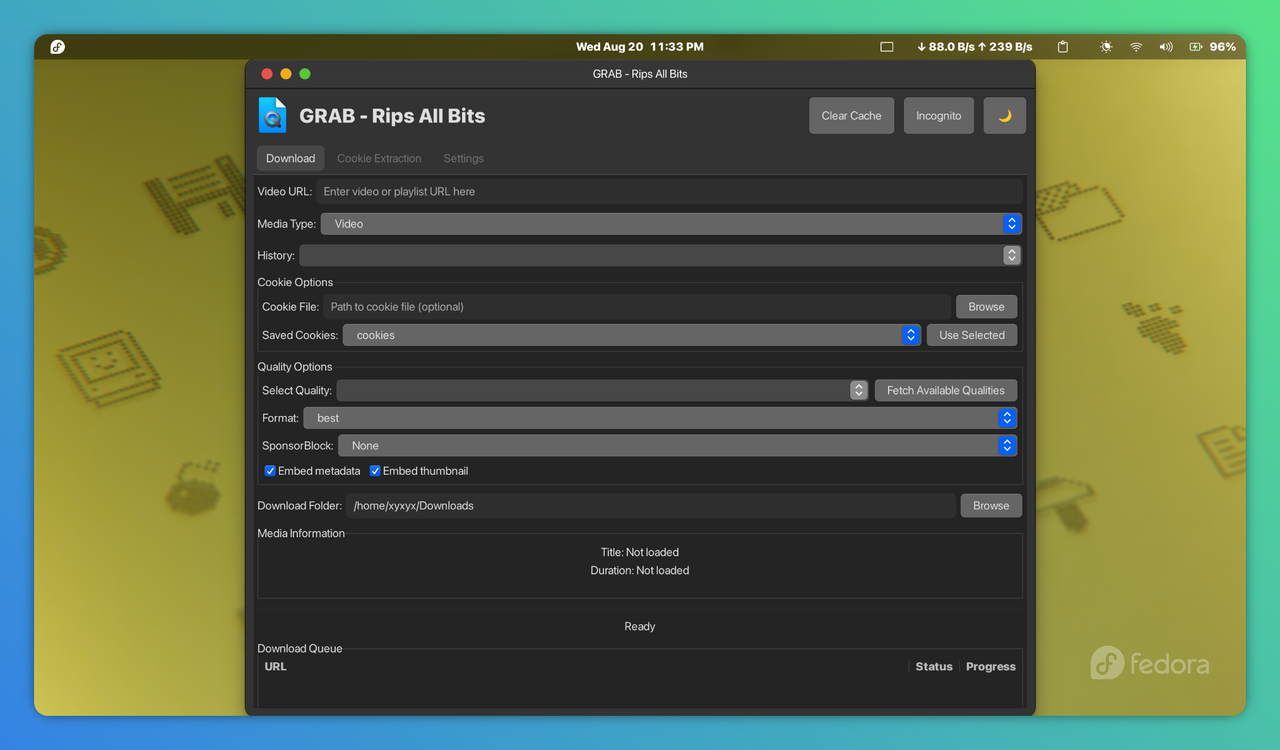
- Easy Media Downloading: Download videos and audio from hundreds of sites
- Quality Selection: Automatic quality detection and manual selection
- Cookie Management: Built-in browser for cookie extraction and management
- Download Queue: Manage multiple downloads with a queue system
- History Tracking: Keep track of previously downloaded content
- Theme Support: Light and dark mode with system theme detection
- SponsorBlock Integration: Automatically remove sponsored segments from videos
- Metadata Embedding: Preserve metadata and thumbnails in downloaded files
- GNOME Integration: Native look and feel for Fedora GNOME users
# Install Python and GTK dependencies
sudo dnf install python3 python3-pip python3-gobject gtk3

# Install WebKitGTK for cookie extraction
sudo dnf install webkit2gtk3-devel

# Install yt-dlp
sudo dnf install yt-dlp
# or for the latest version
sudo pip3 install yt-dlp# Install Python and GTK dependencies
sudo apt update
sudo apt install python3 python3-pip python3-gi python3-gi-cairo gir1.2-gtk-3.0
# Install WebKitGTK for cookie extraction
sudo apt install gir1.2-webkit2-4.0
# Install yt-dlp (required for downloading)
sudo apt install yt-dlp
# Alternatively, install the latest yt-dlp with pip
sudo pip3 install yt-dlp
# Install additional Python dependencies
sudo pip3 install requests# Install Python and GTK dependencies
sudo pacman -S python python-pip python-gobject gtk3
# Install WebKitGTK for cookie extraction
sudo pacman -S webkit2gtk
# Install yt-dlp
sudo pacman -S yt-dlp
# or
sudo pip install yt-dlp# Install Python
brew install python
# Install GTK+3
brew install gtk+3
# Install WebKitGTK
brew install webkit2gtk
# Install yt-dlp
brew install yt-dlp
# Install PyGObject
pip3 install pygobject3
# Install additional dependencies
pip3 install requests- Install Python from python.org
- Install GTK3 from gtk.org
- Install WebKitGTK (included in GTK3 bundle)
- Install yt-dlp:
pip install yt-dlp requestsClone or download this repository
Make the script executable:
chmod +x ytdlp_gui.pyRun the application:
./ytdlp_gui.pyOr run with Python directly:
python3 ytdlp_gui.py- Enter the URL of the video or playlist
- Select media type (Video or Audio)
- Choose quality and format
- Click "Download" or "Add to Queue"
- Navigate to the "Cookie Extraction" tab
- Enter a website URL and click "Open Browser"
- Login to the website in the built-in browser
- Click "Extract Cookies" to save authentication cookies
- Configure default download options
- Choose theme preferences
- Set default download location
"WebKit2 not found" error: Make sure you've installed the WebKitGTK development packages
- On Fedora:
sudo dnf install webkit2gtk3-devel - On Ubuntu:
sudo apt install gir1.2-webkit2-4.0
Download failures:
- Ensure yt-dlp is installed and updated:
yt-dlp -U - Check your internet connection
Cookie extraction not working:
- Some websites may have protections against cookie extraction
- Try manually exporting cookies from your browser
yt-dlp -UOr via pip:
pip install --upgrade yt-dlp- yt-dlp - A feature-rich command-line audio/video downloader
- GTK - The GIMP Toolkit for creating graphical user interfaces
- PyGObject - Python bindings for GObject-based libraries
- WebKitGTK - Web content engine for GTK
- Requests - HTTP library for Python
This project was made with the assistance of DeepSeek AI, which provided invaluable coding help and guidance. The original poster has no formal coding background and created this project out of enthusiasm for making media downloading more accessible.
This project was inspired by various GUI frontends for youtube-dl and yt-dlp, with the goal of creating a more comprehensive and user-friendly experience.
IMPORTANT: PLEASE READ CAREFULLY
This software is provided "as is" for educational and personal use only. The developers and contributors:
- Do not endorse or encourage copyright infringement
- Are not responsible for how users employ this software
- Cannot provide legal advice regarding copyright matters
You are solely responsible for ensuring that your use of this software complies with:
- All applicable laws and regulations in your jurisdiction
- The terms of service of any websites you access
- Copyright laws and intellectual property rights
Downloading copyrighted material without proper authorization may violate copyright laws in your country. It is your responsibility to ensure you have the right to download any content.
We do not host, store, or control any content that may be accessed through this software. All media is obtained from third-party sources, and we have no control over the content available on these platforms.
By using this software, you agree that the developers and contributors shall not be held liable for:
- Any damages or losses resulting from the use of this software
- Any legal issues arising from misuse of this software
- Any violations of terms of service of third-party platforms
If you choose to use this software, you do so at your own risk and are solely responsible for any consequences.
This project is open source and available under the MIT License.
Contributions are welcome! Please feel free to submit a Pull Request. Since the original author is learning, patient guidance and clear explanations are appreciated.
If you encounter any problems or have feature requests, please open an issue on GitHub. Please include details about your operating system and the error messages you're seeing.