Releases: Cosmic-Infinity/Colours
Colours v.3.0.0

⚜ Major Release v3.0.0
‣ New separate builds for GUI and Non-GUI versions.
◦ GUI version focuses towards exposing all controls and providing additional options
◦ Non-GUI version is a one-click solution whereby you run it only to update the colour for TranslucentTB.
‣ 💛 Non GUI :
⦾ Removed all dependencies.
⦾ Added path selection, thereby removing restriction on install location of TranslucentTB.
⦾ Massive improvements to speed and reliability.
⦾ No more restrictions on mouse movements or key presses.
‣ 🧡 GUI :
⦾ Exposes all controls in a intuitive and simple GUI
⦾ A robust colour picker for all your needs.
⦾ Path selection for custom install location support.
++ Bug Fixes and Stability improvements all around.
🔰 To use it, you'll need
TranslucentTB by Charles Milette
NOTE: Colours is not compatible with TranslucentTB's Microsoft Store version. Only the GitHub version is supported at present
Colours v.2.0.0
Major Release v2.0.0
‣ Removed PowerToys Dependency (improvement to performance)
‣ Universal file location support.
‣ Fixed (mostly) "open with/ search microsoft store for apps" bug
‣ Fixed some more System Delay based bugs.
‣ Icon not showing up issue seems to have fixed itself? 🤔
🔴 To use it, you'll need
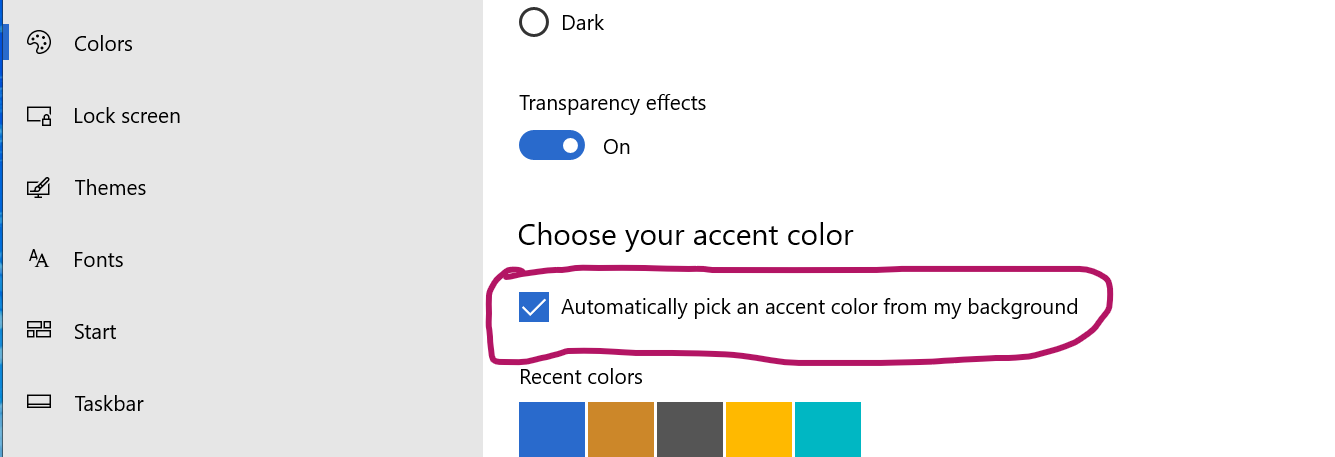
👍. MAKE SURE "Automatically pick an accent colour from my background" IS ON IN WINDOWS PERSONALIZATION SETTINGS OTHERWISE COLOURS WON'T CHANGE AUTOMATICALLY (If the colour being chosen is random, this is probably the culprit)
👍 . TranslucentTB by Charles Milette (https://github.com/TranslucentTB/TranslucentTB/releases/latest)
NOTE: Colours is not compatible with TranslucentTB's Microsoft Store version. Only the GitHub version is supported at present
To avoid conflicts, make sure
- TranslucentTB's config file
%UserProfile%\AppData\Roaming\TranslucentTB\config.cfg - TranslucentTB is installed in
%programfiles(x86)%\TranslucentTB\TranslucentTB.exe
To check these just press Win + R and then paste the locations to confirm if TranslucentTB and it's config file opens.
Colours v.1.0.0
Initial Release v1.0.0
‣ Enjoy a more colourful Windows 10 experience.
🔴 To use it, you'll need
👍. MAKE SURE "Automatically pick an accent colour from my background" IS ON IN WINDOWS PERSONALIZATION SETTINGS OTHERWISE COLOURS WON'T CHANGE AUTOMATICALLY (If the colour being chosen is random, this is probably the culprit)
👍 . TranslucentTB by Charles Milette (https://github.com/TranslucentTB/TranslucentTB/releases/latest)
👍 . PowerToys by Microsoft (https://github.com/microsoft/PowerToys/releases/latest)
NOTE: Colours is not compatible with TranslucentTB's Microsoft Store version. Only the GitHub version is supported at present
To avoid conflicts, make sure
- PowerToys is installed in
%programfiles%\PowerToys\PowerToys.exe - TranslucentTB's config file
%UserProfile%\AppData\Roaming\TranslucentTB\config.cfg
To check these just pressWin + Rand then paste the locations to confirm if PowerToys starts, and TranslucentTB config file opens.