Patch for playing world record games in Black Ops II Zombies for First Room games. It is fully tuned to ensure integrity of every type of First Room games accordingly to most recent ruleset (including vote from April 2023). This patch has previously been known as First Room Fix.
Please inform me about any issues you may encounter with the patch, so they can be fixed, preferably with decent amount of information in what circumstances an issue occured. The main channel for issues is GitHubs Issues section, although it won't hurt to ask about it on Discord first
Before reporting a problem, please check out the FAQ section down below, you may find answers you're looking for there
Also check out a B2 website with useful tools and data
This patch is meant to be used during First Room games. Below you can see alternatives for other categories
| Category | Patch | Creator | Link |
|---|---|---|---|
| Highrounds / Round speedruns | B2OP | Zi0 & Astrox | GitHub |
| EE Speedrun | Easter Egg GSC Timer | HuthTV | GitHub |
| Song Speedruns | B2SONG | Zi0 | GitHub |
Tip
For World at War you can check Evelyn's community patch
Tip
For Black Ops I you can check Evelyn's CT5 mod, in that game patching is NOT allowed, however you can use a plugin (which is similar as you'd use a tool like TIM or LiveSplit with game hooks)
Tip
For Black Ops III you can check oJumpy's community patches
Since version B2FR v1, the patch is only available for modern versions of Plutonium. Download most recent version of your choice from releases. Downloading raw code from code section will not work!
Download either of the scripts b2fr-hud.gsc or b2fr-nohud.gsc and put them in your Plutonium folder, which is located here by default:
%LOCALAPPDATA%\Plutonium\storage\t6\raw\scripts\zm
Tip
You can press CTRL + R on your keyboard and paste this string there. Assuming you haven't changed any Plutonium paths, directory with scripts should open right away.
Warning
Prior to patch version 3.0, the directory we recommended here was Plutonium\storage\t6\scripts\zm (the only difference is that raw folder in the middle), you should still use that directory if you want to use the patch in 2905. On modern Plutonium, it is recommended to start using the new location (remove the patch you currently have in the old location and place the updated version in the new directory specified above)
Tip
I've created a video on how to install these patches in case instructions here are unclear
Caution
Whenever there's a new major patch release (eg. 2.* to 3.0 or 3.* to 4.0), please note that a lot of internal logic changes, therefore stability may not be up to the full standard. While we recommend you update your patch as we fix issues and add new features, we acknowledge increased risk with new major versions, which is why we usually leave most recent release of last major version in releases for some time, so players can access it until new version was battletested and issues have been fixed. We appreciate early adopters, who by reporting any problems help us provide the stable experience.
- Basic anticheat capabilities (DVARs, Box etc.)
- Fixed network frame (you may know it as a Tickrate issue)
- Full bank
- Reset backspeed values to the level of a Steam version (consistently with First Room ruleset)
- Automatic permaperks assignment (consistent with in-game logic)
- Automatic permaperks removal (if obtained illegaly, for instance during breaks)
- Optional character/viewmodel setting
- Disabled DOF (Depth of Field)
- On Nuketown, the mannequin next to the yellow bus is automatically removed
- On Nuketown, players are warned if Jugg is going to be in the first room
- On Origins, reticle is always default
- On Origins, game is always in custom game mode (zombie blood from reward box)
Starting on Plutonium version R4516, the launcher is able to show checksum of each of the patches you have as well as the entire game memory (i'm massively oversimplifying here, geeks give me a break). Here as an article about what a checksum is. Every file has a different signature, and changing as much as a single letter in the patch changes it's signature entirely.
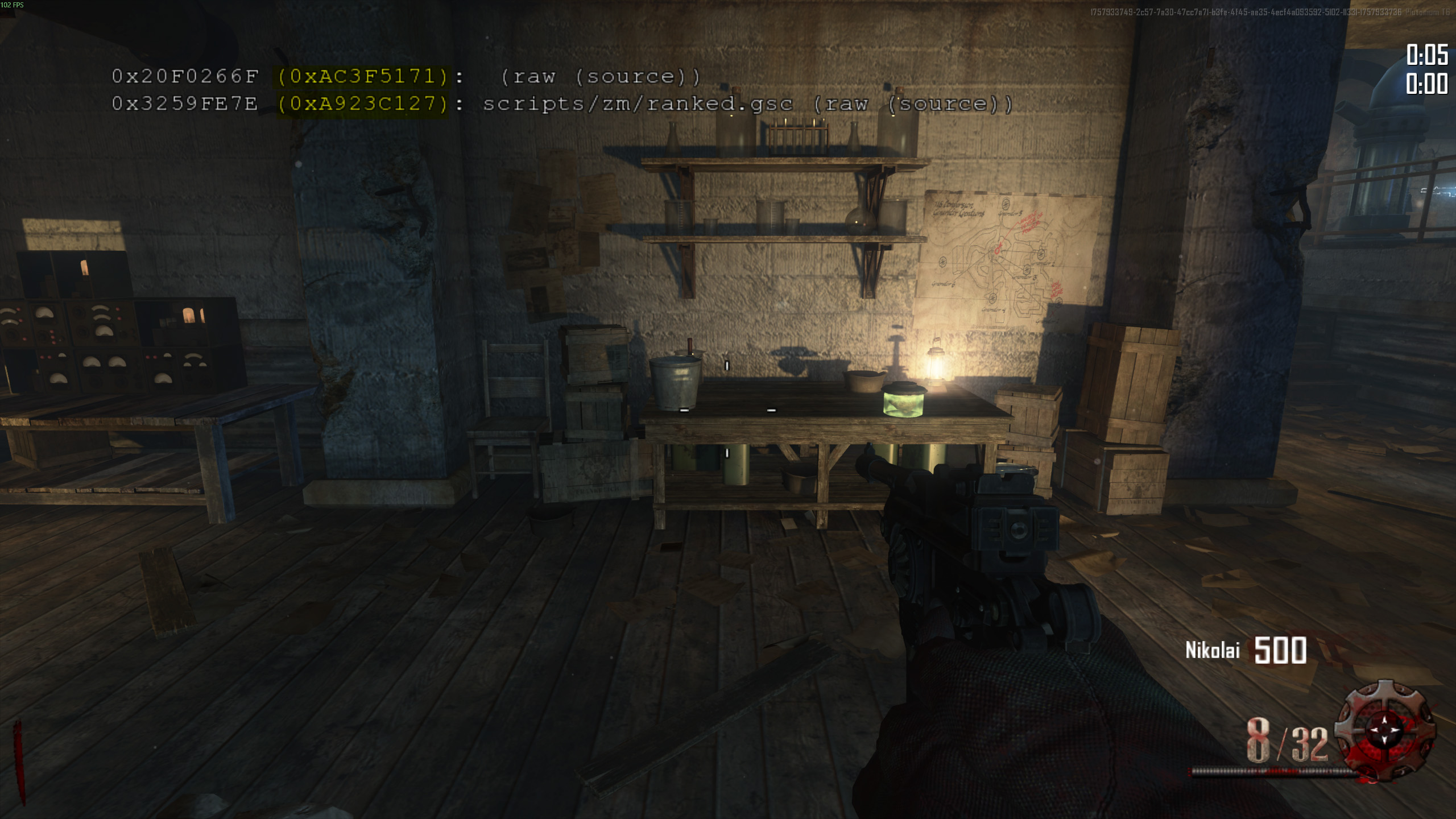
As you can see on the screenshot above, each of the GSC files you have loaded into the game is listed by the game. Occurance of this data is navigated by cg_flashScriptHashes DVAR (do not worry, the patch will set this DVAR for you automatically, no action required).
Each line represents a different GSC file. At the beginning there are 2 checksums, we're using the 2nd one in parenthesis for validation (the highlighted one). Afterwards comes the file name (if the patch is not compiled) or (raw (source)) if patch is compiled. In case of B2FR it'll be the latter. You may use tool mentioned here to validate the file using that checksum.
Note
Checksums on the screenshots are used for example purposes, they're not representative of currently valid GSC files, do not use those values for validation.
Again, i use this term to help people understand the concept, please do not get mad. Those are checksums generated from the game memory and represent the factual state of your game. This is a combination of patches/mods you loaded and internal game stuff. Those can only be generated by the game and whether or not they'll be useful for checking legitimacy is to be seen. They are not part of this screenshot and are managed by a different DVAR cg_drawChecksums (also managed by the patch).
Checksum of each new B2 patch version will be attached to the release, which will allow you to verify whether a valid patch is used yourself. In terms of what the patch do, it force enables displaying those checksums certain rounds (details on that below). They are only shown for few seconds and not on milestone rounds (to not ruin screenshots etc.)
I've created a tool for doing just that, type in the checksum (one highlighted on the screenshot above) and press Check. If checksum is registered in the system, you'll see all the relevant details about the file. Altenatively, you can drag the file itself into the page to see it's checksum (and details if the system has them).
You should expect checksums to be displayed at the end of following rounds (for version 3.3 onwards)
End of 18, 28, 38 onwards up to the end, and additionally
| Type of game | Start of additional displays |
|---|---|
| Town Solo/Coop | End of .3 rounds from 73 onwards |
| Town 3p/4p | End of .3 rounds from 63 onwards |
| Other maps Solo/Coop | End of .3 rounds from 53 onwards |
| Other maps 3p/4p | End of .3 rounds from 43 onwards |
- My game is restarting automatically, how do i fix it?
- You don't, that's intended behavior of the system that's giving you permaperks to prevent a rare bug where permaperks were not taken away from players sometimes. How it works is you load into the game, each player is scanned for missing permaperks, if anyone is missing something, they're awarded missing permaperks, and then the game will force a restart. After the restart you are free to carry on. Do note, most of the time you are going to lose some of the perks almost instantly, so restarts few minutes in will require the process to repeat. If you restart on round 1, the permaperk awarding system will not be initiated to prevent issues like infinite restarts on Tranzit, where players would kill a zombie too fast and game would just keep giving them perma headshot damage back.
- I put the patch in the right folder but it does not work
- Make sure you downloaded compiled version from releases section (do not download the zip file called Source code, it is added to the release automatically by github and contains raw code, that is not going to work) and that you downloaded the right version for the right launcher. Failing to do so may result in the patch not working at all, or misbehaving, which in some situations can cause your game to not be legit. Always match names of released files with the launcher you're using. Read Installation instructions above.
- Is there anything i need to worry about regarding legitimacy of my game while using this patch?
- Do not use this patch for categories it's not meant for. I've linked alternatives to other categories in a table above in Categories section. There isn't anything in this patch that is strictly forbidden for let's say a highround, however certain features may not be optimal or seen as grey area stuff by other communities.
- Always familiarize yourself with rules for a particular room / sub-category, this patch will not do all the work for you.
- I heard this patch may cause early errors
- Technically any external script you load into your game will cause extra overhead, but B2FR is stable enough for playing out a game. If you notice any issue regarding stability, please let me know. I'm just a human, mistakes can always be made
- Why support for other launchers has been dropped
- Because it is not needed. The best option for playing Black Ops II zombies is currently live Plutonium version, there's no need for using other launchers or even version 2905.
- What is a DVAR
- DVAR is a variable that player can (usually) modify from the game console. DVARs mentioned in this document are all changeable. In order to set a DVAR, press
~button, then type in dvar name, and value you want to assign to it, like so
cg_drawReset 1
- There is a bunch of text showing up on my screen while playing on Plutonium with this patch
- Yes, most of it is either Plutonium anticheat stuff that the patch triggers, or data about the game that is useful for both you the player and also people who watch/validate your game. Even tho it may look like a lot, the patch was built to show as little as possible while providing all important info.
- I'm getting an error about having 2 patches loaded at the same time.
- Plutonium have changed their go-to directory for scripts, but they maintain them for backwards compatibility. Try the following
- Check if you still have a
t6rfolder in your Plutonium directory, if so, just remove it (it's a leftover from earliest versions of Plutonium) - Check if you have anything in
Plutonium\storage\t6\scripts\zm, if so, just remove it. The patch should be inPlutonium\storage\t6\raw\scripts\zmalongsideranked.gscfile according to current Plutonium guidelines.
- Check if you still have a
- Make sure you're using correct and up to date version and that the downloaded file is compiled (open in Notepad, if it's bunch of gibbrish, you know it's compiled)
- Remove other patches. B2 Extensions should not cause any issues, but if you are using any, for the sake of troubleshooting remove them as well.
- Check if the directory the patch is in is correct. Perhaps you have multiple instances of Plutonium or Redacted and you put it in the directory belonging to another instance.
Elements listed here are not present in nohud version of this patch
- HUD elements scale accordingly to aspect ratio (solo only, because it's dependent on the ratio of hosts game, cannot be changed for clients separately via gsc patch)
- Timer & Round timer
- Shows times for key splits (round 20, 30 etc), the splits can be customized by config file
- Velocity meter (toogleable with
velocity_meterdvar, set to 1 or 0 respectively) - Horde count is printed out at the beginning of each round past 20 (works like zombacus, not a live zombie counter)
- Permaperks tracker (info when and what was gained / lost)
- Semtex prenades are printed out each round on Town Semtex and Nuketown No Magic
Prior to version 2.1 splits were not fully accurate. Starting on 2.1, B2FR emulates the logic used by original code to calculate the accurate red number moment (end of fade-in transition). Below is a table showing time difference for each split between the actual red number time and time displayed by split message.
| Round split | Offset (+ seconds) |
|---|---|
| 30 | -0.25 |
| 50 | -1.25 |
| 70 | -2.25 |
| 100 | -4.25 |
On Plutonium version R4516+ you can customize on which rounds splits are going to be shown, in order to do that
%localappdata%\Plutonium\storage\t6\raw\scriptdata
Or wherever your Plutonium is installed. If some part of this path is missing on your pc, just create empty folders.
Then proceed to create a b2fr folder inside of scriptdata, create splits.txt file inside. You can specify all splits you want displayed there, for example, writing the following contents to the file, will cause splits to show on rounds 15, 18, 21, 24, 27 and 30.
15
18
21
24
27
30
As of B2FR version 3.3, you can set splits using chat messages as host. Under the hood, the patch will just overwrite contents of the file described above.
- To check current custom splits settings type
splitsin chat - To remove custom splits settings and revert to default, type
splits 0 - To define new set of custom splits, type
splits 2 3 4 5, which will cause the splits to show on rounds 2, 3, 4 and 5. Adjust round numbers accordingly
Warning
If the splits.txt file is not empty, default splits rounds used by the patch no longer apply, so you need to specify ALL of the rounds you want it to show up yourself.
Note
In a coop game, splits defined by the host player will apply to all players.
Warning
Splits customization (much like any other feature based on file IO) won't work if you have scr_allowFileIo dvar set to 0
- Built in support for Top Barn challenge (integrity checks for rules and if players remain within the right area)
- Built it support for Yellow House challenge (integirity checks for rules and if players remain within the right area)
Patch does award players with permaperks on connect, but only at the beginning of the game. Players joining in progress will not be given any permaperks. Every player joining the game past round 15 will have PermaJug taken away from him. List of permaperks awarded by B2FR
| Perk | Notes |
|---|---|
| Revive | - |
| Better Headshots | - |
| Tombstone | - |
| Mini-Jug | Will not be awarded if game starts past round 15, will also actively be taken from players past round 15 |
| Flopper | Only on Buried |
| Nube | Only on Buried. Will be actively taken away on Tranzit & Die Rise and also will be removed past round 10 on Buried |
Note
The game will restart automatically after awarding players with permaperks.
You can predefine which character you're going to be playing with
Note
You don't need to have the patch in for character selections to work if you're the off-host player, as long as the host has it, it'll work.
Note
If in a coop game a player does not use any preset, it is possible for him to take a character before player with that character set. In that case preset will not work. In order for the system to work properly, have all players in the game set their presets.
Note
Character settings are the same for B2FR & B2OP, which means you don't need to change the settings between these 2 patches
Tip
When using fast_restart, characters for off-host players are evaluated before host (that's how the game does it). I've decided to not change this behavior as it'd require further changes of the existing game logic. Instead, in order to preserve priority of character selection, use map_restart command.
In order to set a character, paste the right command into the console in the main menu (or at any point before the game actually begins). You may have to leave the map and enter again for it to take effect if you do it in game. For survival maps, host setting applies to all players. Please note, if a character is already taken, your setting will not be applied.
Note
You don't need to have the patch in to enter this command. But host of your game needs to have it, so it's properly interpreted.
- CIA
statwriteddl playerstatsbymap zm_highrise weaponlocker lh_clip 2;uploadstats
- CDC
statwriteddl playerstatsbymap zm_highrise weaponlocker lh_clip 1;uploadstats
- Misty
statwriteddl playerstatsbymap zm_highrise weaponlocker clip 3;uploadstats
- Russman
statwriteddl playerstatsbymap zm_highrise weaponlocker clip 1;uploadstats
- Stuhlinger
statwriteddl playerstatsbymap zm_highrise weaponlocker clip 2;uploadstats
- Marlton
statwriteddl playerstatsbymap zm_highrise weaponlocker clip 4;uploadstats
- Weasel
statwriteddl playerstatsbymap zm_highrise weaponlocker stock 4;uploadstats
- Billy
statwriteddl playerstatsbymap zm_highrise weaponlocker stock 3;uploadstats
- Sal
statwriteddl playerstatsbymap zm_highrise weaponlocker stock 2;uploadstats
- Finn
statwriteddl playerstatsbymap zm_highrise weaponlocker stock 1;uploadstats
- Dempsey
statwriteddl playerstatsbymap zm_highrise weaponlocker alt_clip 1;uploadstats
- Nikolai
statwriteddl playerstatsbymap zm_highrise weaponlocker alt_clip 2;uploadstats
- Takeo
statwriteddl playerstatsbymap zm_highrise weaponlocker alt_clip 4;uploadstats
- Richtofen
statwriteddl playerstatsbymap zm_highrise weaponlocker alt_clip 3;uploadstats
In order to disable presets (to restore randomized characters) use following commands
- Survival maps
statwriteddl playerstatsbymap zm_highrise weaponlocker lh_clip 0;uploadstats
- Tranzit / Die Rise / Buried
statwriteddl playerstatsbymap zm_highrise weaponlocker clip 0;uploadstats
- Mob of the Dead
statwriteddl playerstatsbymap zm_highrise weaponlocker stock 0;uploadstats
- Origins
statwriteddl playerstatsbymap zm_highrise weaponlocker alt_clip 0;uploadstats
You can use chat commands to manage characters. After changing the settings, the game will have to be restarted to take effect (that's the recommended way to change characters in game, as stat command may not always work). The patch will only listen for the chat messages about characters for first two rounds. Enter following message into the chat:
char <name>
Where is the name of the character. Following values are accepted:
misty russman stuhlinger marlton weasel billy sal finn dempsey nikolai takeo richtofen cia cdc
You can also reset character presets by typing in
char reset
Tip
You can check which preset you currently have set by entering whoami in the chat
As a response to drawbacks in the character system, we added additional functionaltiy that allows you to swap only the viewmodel (hands in first person), as oppose to the entire character. Changes here will apply instantly and have no effect to any game logic (as far as the game is concerned, the character has not been changed). You may swap viewmodels either by using view chat message or viewmodel dvar, followed by one of these values
misty russman stuhlinger marlton weasel billy sal finn dempsey nikolai takeo richtofen cia cdc
or
reset
to set viewmodel back to what it should be with your original character.
If you'd like to contribute to the code, please fork this repository, apply changes / fixes and open a pull request. If the change is in line with rules and the purpose of this patch, it'll be merged and a new version of the patch will be released.
Following things are required:
Install Python (and make sure to check adding it to the system PATH while doing so). Download gsc-tool, do not change the name of the program, put it in the main directory of the project.
After applying desired changes, run script compile.py while in the patch main directory (press on address bar in the folder view, put cmd and press enter. A command line will open with that folder already set). Run script by putting in python compile.py. If you did everything right, script should compile everything for you and put stuff in right folders.
Note
Please note, as the modding scene for BO2 is still very young, stuff and tech is changing rapidly. Above description may not always be up to date, but i will try to not let that happen too often.
Here is a list of weaponlocker stats B2 patches use to persist settings. Note, Tranzit stats are all used by the game, all the other maps are available to use by modders.
| Map | Stat | Component | Effect |
|---|---|---|---|
| zm_highrise | clip | Characters | Controls character preset on Victis maps |
| zm_highrise | stock | Characters | Controls character preset on MOTD |
| zm_highrise | alt_clip | Characters | Controls character preset on Origins |
| zm_highrise | lh_clip | Characters | Controls character preset on survival maps |
| zm_prison | clip | RNG | (B2OP) Controls MOTD key position overrides |
| zm_prison | stock | Permaperks | (B2OP) Controls Purist mode |
| zm_prison | alt_clip | Gameplay | (B2OP) Controls strafespeed scale |
| zm_prison | lh_clip | Gameplay | (B2OP) Controls backspeed scale |
| zm_tomb | clip | Gameplay | (B2OP) Controls tank depatching |
Since some people just don't like updating, I'm leaving this legacy info regarding current state of legitimacy of old versions
I will not be going deep into how and why Network Frame drama even came to be. But regarding First Room Fix, initial version of the fix has been implemented in Version 4, and remained unchaged until Version 5.2
That initial version of the fix was incorrect.
| VERSION | LEGIT - SOLO | LEGIT - COOP |
|---|---|---|
| V3 & NO PATCH | NO | YES |
| V4 & V5.0 & V5.1 | YES | NO |
| V5.2+ | YES | YES |
There was a flaw somewhere in the permaperk logic, that was causing the system to malfunction under certain conditions, if the perks are artificially awarded in the same game.
There's been few versions of the system, but up until version 6, the system was more or less malfunctioning
| VERSION | RISK - SOLO | RISK - COOP |
|---|---|---|
| V4 | HIGH | HIGH |
| V5.0 - V5.5 | HIGH | HIGH |
| V5.6 | LOW | HIGH |
| V5.7 | ZERO (system disabled) | ZERO (system disabled) |
| V6 | VERY LOW | VERY LOW |