TBD-course-description
- Who is this for: TBD-audience.
- What you'll learn: TBD-objective.
- What you'll build: TBD-result.
- Prerequisites: TBD-prerequisites.
- How long: This course is TBD-step-count steps long and takes less than TBD-duration to complete.
- Above these instructions, right-click Use this template and open the link in a new tab.

- In the new tab, follow the prompts to create a new repository.
- For owner, choose your personal account or an organization to host the repository.
- We recommend creating a public repository—private repositories will use Actions minutes.
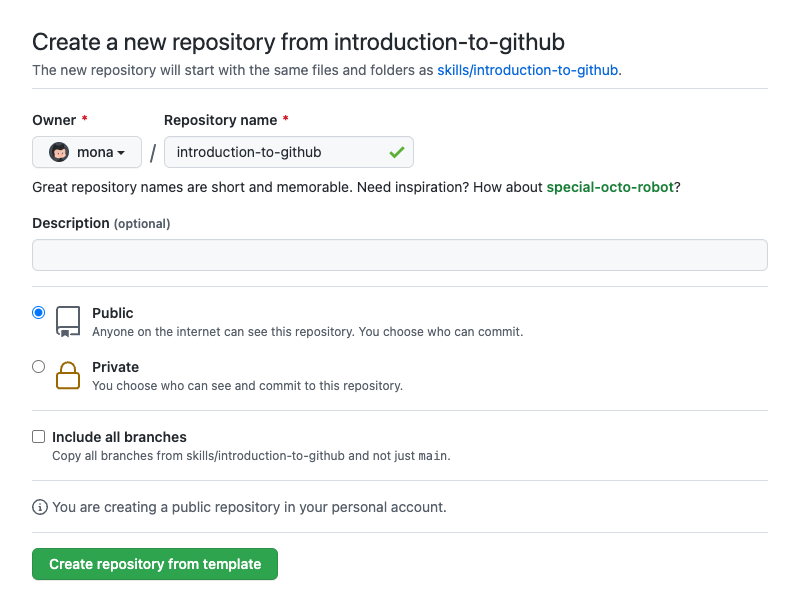
- After your new repository is created, wait about 20 seconds, then refresh the page. Follow the step-by-step instructions in the new repository's README.
Welcome to "TBD-course-name"! 👋
TBD-step-1-information
What is TBD-term-1: TBD-definition-1
- Open STM32CubeIDE.
Congratulations friend, you've completed this course!
Here's a recap of all the tasks you've accomplished in your repository:
- TBD-recap.
- TBD-continue.
- We'd love to hear what you thought of this course.
- Take another TBD-organization Course.
- Read the GitHub Getting Started docs.
- To find projects to contribute to, check out GitHub Explore.
Get help: MASB support • Review the GitHub status page
© 2022 Albert Álvarez-Carulla • Code of Conduct